
3 · Connect your ads
Ad spend is the difference between "I sold RM 120,000" and "I made RM 21,000". Until an ad account is connected, every profit figure in Inseller is overstated by exactly what you spent.
TikTok Ads (GMV Max) — one-click OAuth. Meta / Facebook Ads — manual token, no OAuth. Shopee Ads — per-shop OAuth from the Shopee checklist, not from this page. Everything else (including Google Ads) has no connector; use the file import in step 5.
Before you start
Open Integrations again
Settings›Integrations
— the same page you used for the store.
Ad accounts sit next to the shop that runs them. On a connected TikTok Shop card you will see "Ads · GMV Max — no ad data. Connect its ad account ↓ if this shop runs ads" — that link scrolls you straight to the right card.
TikTok Ads (GMV Max) — one click
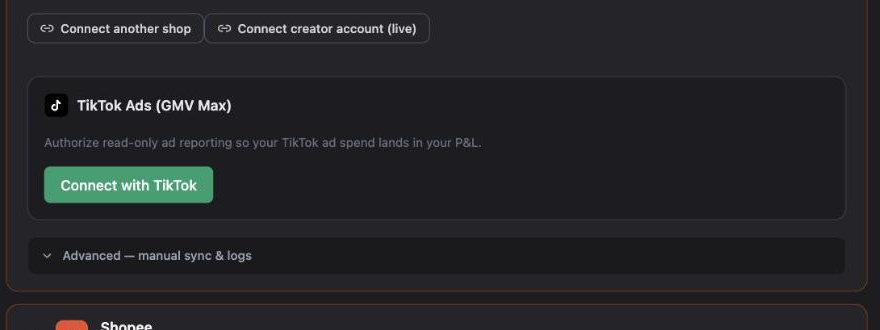
Find the TikTok Ads (GMV Max) card inside the TikTok Shop group — "Authorize read-only ad reporting so your TikTok ad spend lands in your P&L." Click Connect with TikTok.
 1
1
On TikTok's authorization screen:
- Sign in to the TikTok account that owns the ad account.
- Tick the advertiser accounts you want Inseller to read.
- Confirm. You come straight back and the card reads "Authorized — spend appears on each shop above".
There is no advertiser picker inside Inseller. If you authorize several advertiser accounts at once, only the primary one is stored and the rest are silently ignored. Authorize one advertiser per connection, and use + Connect another ad account for the next one.
TikTok does not tell us how long a grant lasts, so Inseller shows an estimate of 30 days from connecting. Syncing keeps running past that date — only a rejected refresh forces a reconnect, and then the card shows a Reconnect required chip.
Meta / Facebook Ads — system user token
Meta has no one-click flow. You create a read-only system user in Business Settings and paste its token. Expand Optional integrations → Meta, then Manual setup — how to get these, and follow the three steps below.
-
Business Settings → Accounts → Ad Accounts: copy the account's numeric ID —
the digits after
act_. Example shape:568199270906422. -
Business Settings → Users → System Users: add a system user and assign that ad account
with the
ads_readpermission. -
Generate a token for that system user with
ads_readand no expiry, then paste the account ID + token into Inseller and click Save.
Then switch Enable sync on. Spend starts landing on the next hourly run.
If you run Click-to-WhatsApp campaigns, also fill the CAPI fields on the same card (dataset ID, WhatsApp Business Account ID, Facebook Page ID). Without them, WhatsApp-driven orders cannot be attributed back to the ad that produced them.
Use a system user token, not your personal one. A personal token dies when you change your password or Meta rotates it — and your ad spend silently stops updating.
Shopee Ads — from the Shopee checklist
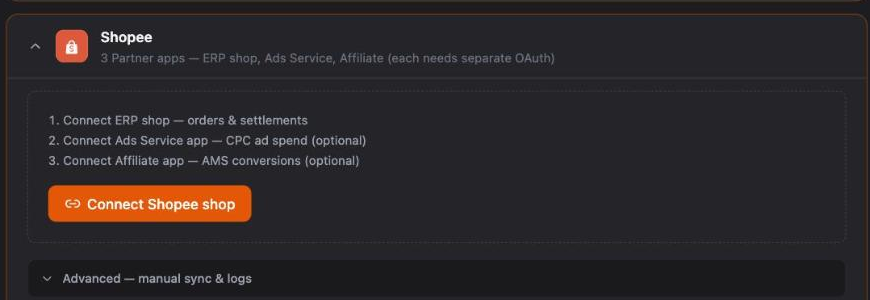
Shopee CPC spend is not on the ads panel. It is the second of Shopee's three Partner apps and it authorizes per shop.
Integrations›Shopee
› your shop row ›
Connect Ads
 1
1
Repeat per shop — a second Shopee shop needs its own three authorizations.
No API? Import the export file instead
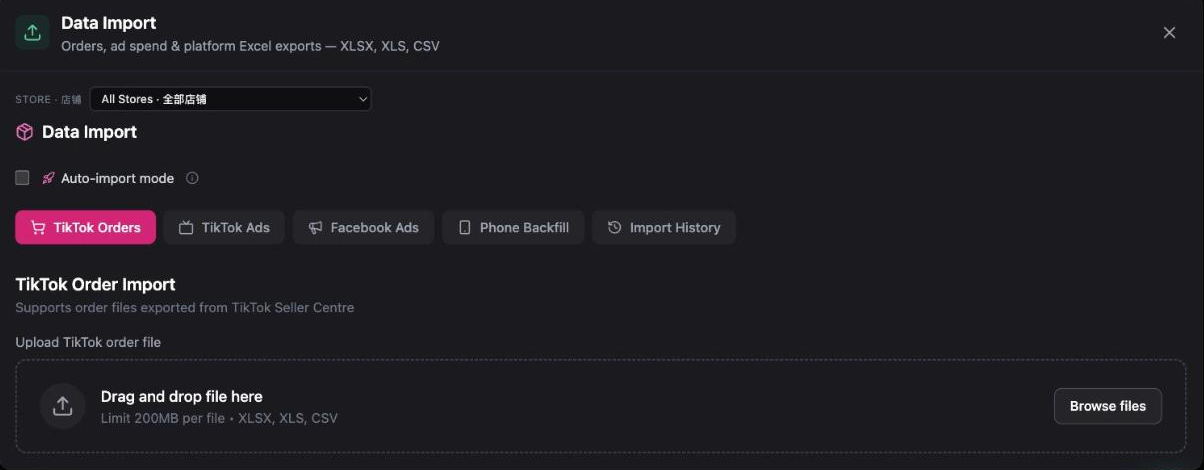
Anything without a connector — Google Ads, a platform you just started on, or a month of history from before you connected — goes in through Data Import.
Settings›Data Import
 1
2
1
2
| Tab | Export it from |
|---|---|
| TikTok Ads | TikTok Seller Centre → GMV Max. Live Ads and Product Ads are detected automatically; you can upload several files at once. Pick the right Studio — imports tagged to the wrong shop are blocked. |
| Shopee Ads / Shopee SG Ads | Shopee Ads Manager, CSV. |
| Facebook Ads | Facebook Ads Manager export (including WhatsApp messaging campaigns). |
| TikTok / Shopee Orders | Seller Centre order export — use this to backfill history from before you connected. |
Limit is 200 MB per file; XLSX, XLS and CSV are accepted.
Once the API is connected for a platform, stop importing that platform's files for the same dates. The API is the source of truth; a file on top of it can inflate spend.
Verify it worked
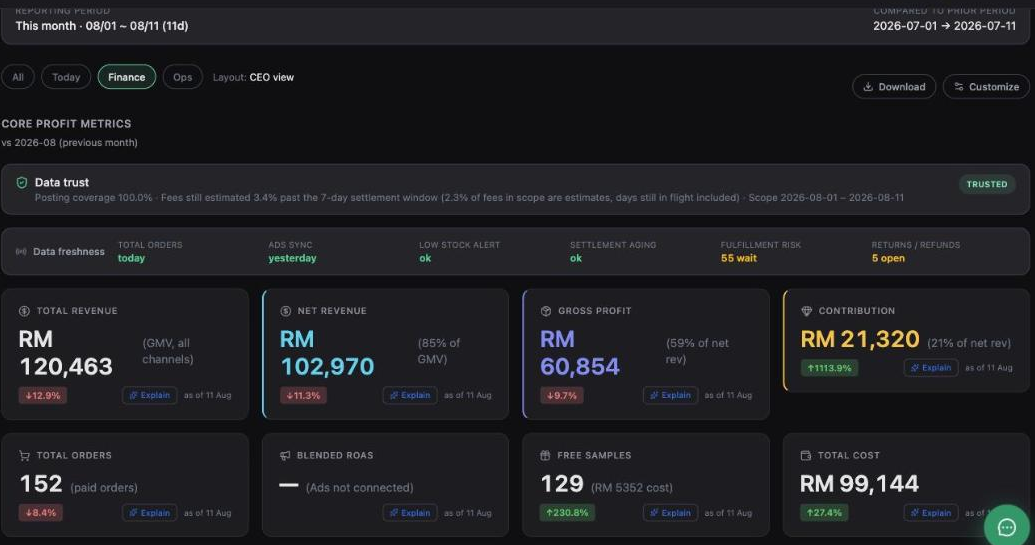
- On the Dashboard, the Blended ROAS tile stops saying "(Ads not connected)" and shows a number.
- The Data freshness strip shows Ads sync: today or yesterday — not blank.
- Contribution drops. That is correct: it now carries the ad bill it always should have.
 1
2
1
2
Troubleshooting
Ad spend shows RM 0 after connecting
Three usual causes: (1) the sync has not run yet — it is hourly, give it an hour; (2) you authorized an advertiser account that isn't the one actually spending; (3) with several advertisers ticked, only the primary was stored. Reconnect with exactly one advertiser, then add the others via + Connect another ad account.
"no_advertiser" after the TikTok redirect
You completed the login but did not tick any advertiser account on the consent screen. Run Connect with TikTok again and make sure at least one advertiser is selected before confirming.
Meta spend stopped updating
The token was revoked or expired — usually because it was a personal token, or the system user lost access to the ad account. Regenerate a no-expiry system-user token with ads_read, re-assign the ad account, and paste it again.
ROAS looks far better than in the platform's own dashboard
Different attribution windows, and platform dashboards count platform-attributed revenue while Inseller blends all channels. Also check that every ad account is connected — one missing account inflates blended ROAS. Shopee's own reporting uses a platform-attribution basis that runs materially higher than money actually received.
I run Google Ads
There is no Google Ads connector. Export from Google Ads and keep that spend in your own records, or treat it as an off-platform cost. Do not read Inseller's blended ROAS as covering it.
Was this page helpful?