
4 · Set your SKU costs
Cost is the last leg of profit. Without it Inseller falls back to an assumed cost percentage — close enough for a demo, useless for deciding which SKU to kill.
Before you start
Open SKU Costs
Settings›SKU Costs
— under What your profit is calculated from.
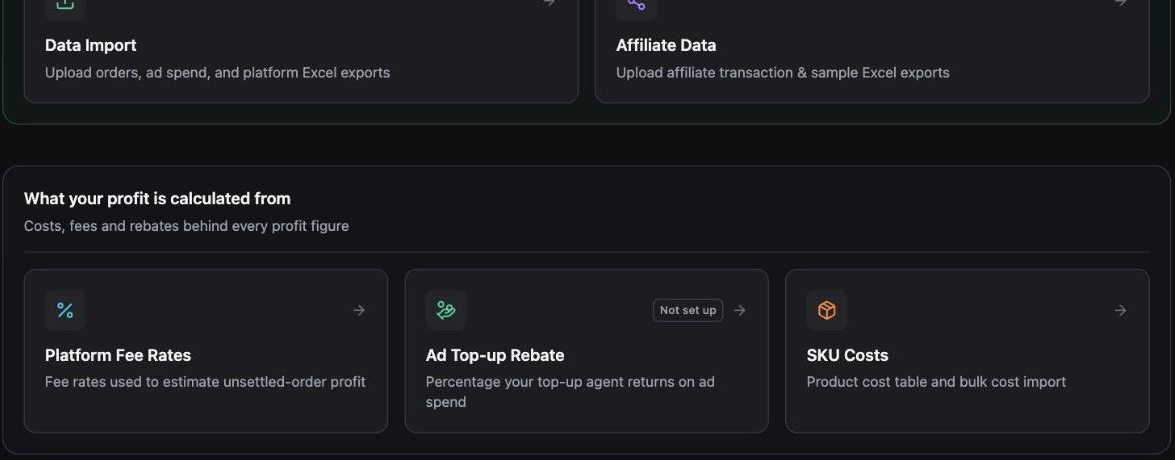 1
2
1
2
If an amber banner is sitting on your settings page telling you some products have no cost, its Set costs → button opens this same panel already filtered to the offenders.
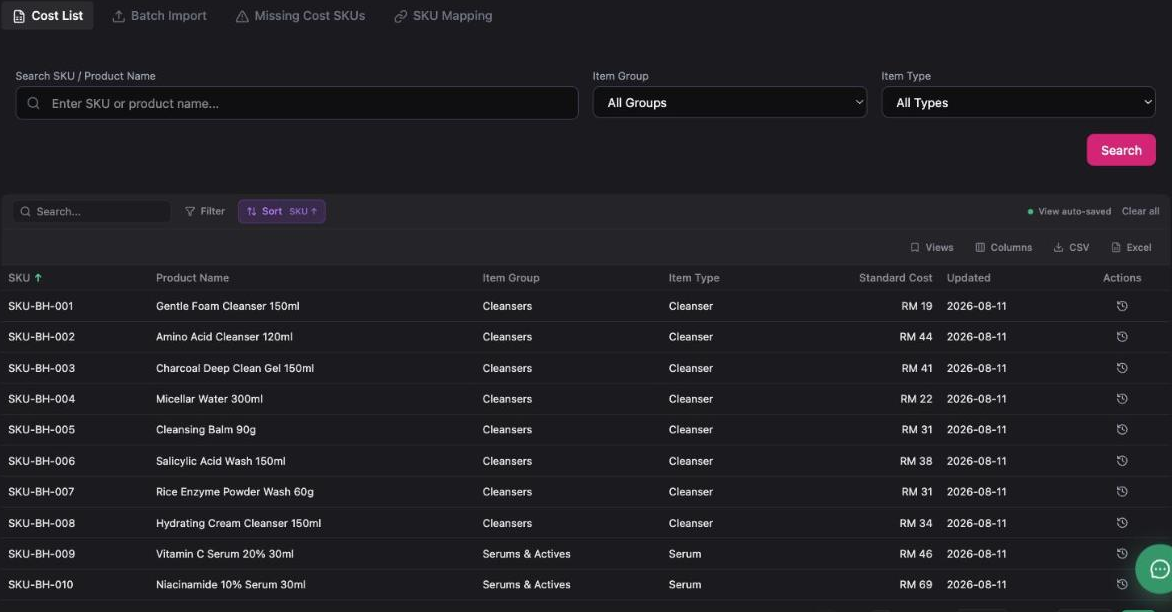
Know the four tabs
| Tab | Use it for |
|---|---|
| Cost List | Search and edit one SKU at a time. Each row keeps a cost history, so you can see what changed and when. |
| Batch Import | Upload a whole cost file, or link a Google Sheet. This is where most of the work happens. |
| Missing Cost SKUs | The list of SKUs that sold but have no cost — ranked by the revenue they affect. |
| SKU Mapping | Point platform SKUs (variants, bundles, per-shop codes) at one master SKU so cost applies once. |
 1
2
1
2
Upload a cost file
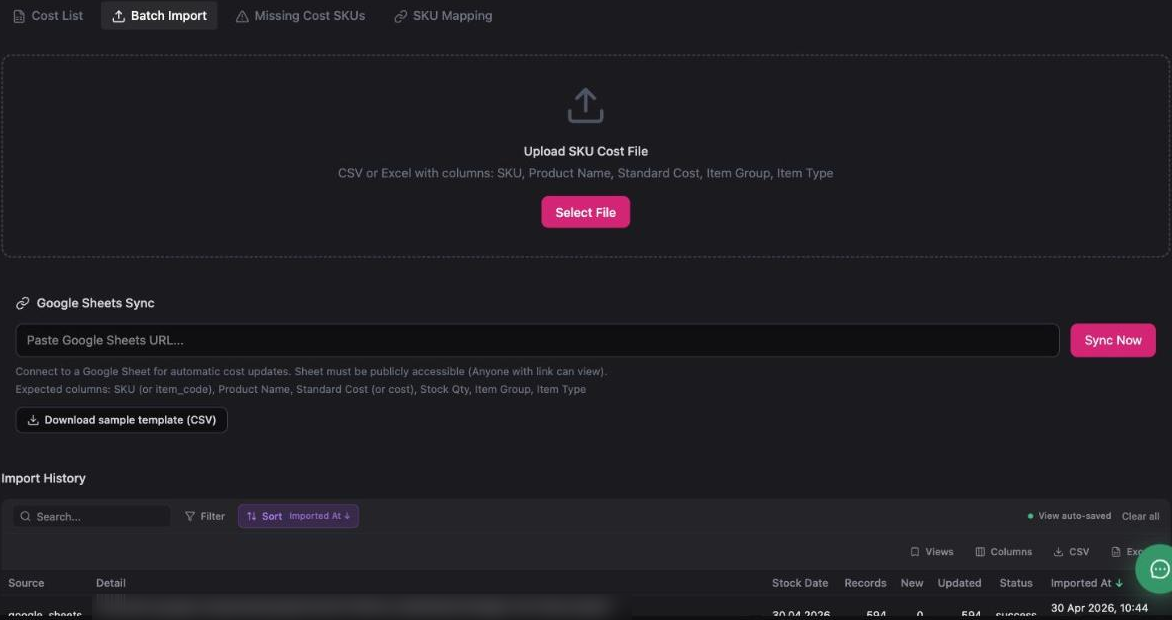
Open Batch Import and work top to bottom:
- Click Download sample template (CSV). You get
sku-cost-template.csvwith the right headers and two example rows. - Fill it in. Required column is SKU and Standard Cost; the rest make the table easier to read and filter.
- Click Select File and pick your CSV or Excel file.
 1
2
3
1
2
3
Columns
| Header | Notes |
|---|---|
SKU (or item_code) | Required. Must match the SKU on your listings, character for character. |
Product Name | For humans reading the table. |
Standard Cost (or cost) | Required. Landed cost per unit, in RM. Numbers only — no "RM", no thousands separator. |
Item Group · Item Type | Your own grouping, used by the filters on the Cost List tab. |
Stock Qty | Optional, accepted by the Google Sheets path. |
Import overwrites the standard cost of any SKU in the file. Old values are kept in the per-SKU cost history, but your dashboard's gross profit changes the moment the import finishes. Upload a corrected file rather than trying to undo one.
Or link a Google Sheet that keeps itself current
If your purchasing team already maintains costs in a sheet, point Inseller at it instead of re-uploading files forever.
- Share the sheet as Anyone with the link can view. Inseller reads it anonymously — a private sheet fails.
- Paste the sheet URL into Google Sheets Sync.
- Click Sync Now.
Expected columns: SKU (or item_code), Product Name,
Standard Cost (or cost), Stock Qty,
Item Group, Item Type.
"Anyone with the link can view" means exactly that. Put costs only in that sheet — no supplier contracts, no margins, no customer data.
Every run is logged under Import History with records read, how many were new, how many were updated, and pass/fail. Check it after the first sync — a sheet with a renamed column reports success with zero updates.
Clear the Missing Cost SKUs list
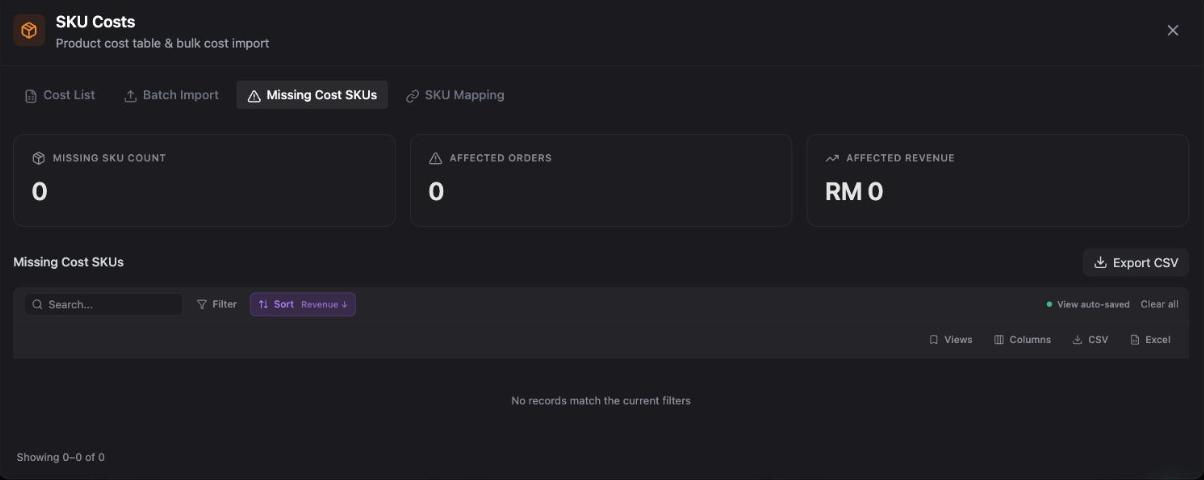
This is the tab that actually tells you whether you are done. It shows how many SKUs have no cost, how many orders they touch, and how much revenue is affected — sorted so the expensive gaps are first.
 1
2
1
2
Practical loop: Export CSV → fill in the cost column → upload it on Batch Import → come back and confirm the counters read zero.
You do not need every SKU priced. The onboarding step completes at 95% coverage of the last 90 days' revenue, because a SKU that never sells cannot distort your profit.
Map variant and bundle SKUs to one master SKU
Same product, three platform SKUs? A bundle that contains two units? Use SKU Mapping so cost is defined once and applied consistently.
| Field | What to put |
|---|---|
| Platform SKU * | The code as it appears on the listing, e.g. VL01-LAV-30ML. |
| Master SKU * | Your internal code, e.g. VL01-LAV. |
| Mapping Type | How the platform SKU relates to the master — direct, or part of a bundle. |
| Cost Ratio | For bundles: the share of the master cost this line carries. A 2-pack is 2. |
| Platform | All Platforms, or restrict to TikTok / Shopee when the same code means different things per shop. |
A wrong Cost Ratio is worse than no cost at all — it produces a confident, wrong margin. Check one bundle order end to end on the Orders page after mapping.
Verify it worked
- Missing Cost SKUs shows 0 affected orders and RM 0 affected revenue — or a residue small enough that you have deliberately ignored it.
- On Orders, open any order: it shows a per-order profit and margin, not a blank.
- On the Dashboard, Gross profit moves after the import. If it doesn't move at all, the SKUs in your file didn't match your listings.
- The onboarding checklist marks Import SKU costs as done.
Troubleshooting
Import says success but nothing changed
Your SKU column didn't match any listing SKU. Trailing spaces, a different dash character, and lower/upper case are the usual culprits. Export from Missing Cost SKUs and copy the SKU strings from there instead of retyping them.
Excel mangles my SKUs or costs
Excel turns codes like 1-2E3 into numbers and drops leading zeros. Format the SKU column as Text before typing, or edit the CSV in a plain text editor. The downloaded template carries a UTF-8 BOM so Excel opens it with the right encoding.
Google Sheets sync fails
The sheet is not publicly readable, or you pasted the edit URL of a sheet inside a shared drive with link sharing off. Open the link in a private window — if you can read it there, Inseller can too.
Margin looks wrong on bundles only
The bundle's platform SKU has its own standard cost and a mapping, so cost is applied twice, or the cost ratio is wrong. Pick one mechanism per SKU: either a direct standard cost, or a mapping to a master SKU.
Which cost should I enter — purchase price or landed cost?
Landed cost: purchase price + inbound freight + duty + any per-unit packaging. Platform fees, shipping to the customer and ad spend are handled separately by Inseller — do not bake them into the SKU cost or you will double-count them.
Was this page helpful?