
Inventory & SKUs
The same lipstick is LIP-RED-01 on TikTok, lipred1 on Shopee MY and
SG-LIP-RED on Shopee SG. Until Inseller knows those are one product, your stock is
wrong, your cost is wrong, and your best seller is hiding behind three half-sized rows.
Why Master SKU exists
Three vocabulary items, and the difference between them is the whole chapter:
| Term | What it is |
|---|---|
| Listing | One product page on one marketplace. You have as many as you have shops. |
| Platform SKU | The code on that listing. Different per shop, often for no reason other than history. |
| Master SKU | Your code for the real physical product. One per thing on your shelf. |
Stock is counted per listing instead of per product, so you oversell. Cost has to be set per listing instead of once. And your top-seller list splits one winner into three mediocre rows.
Grouping listings under one Master SKU
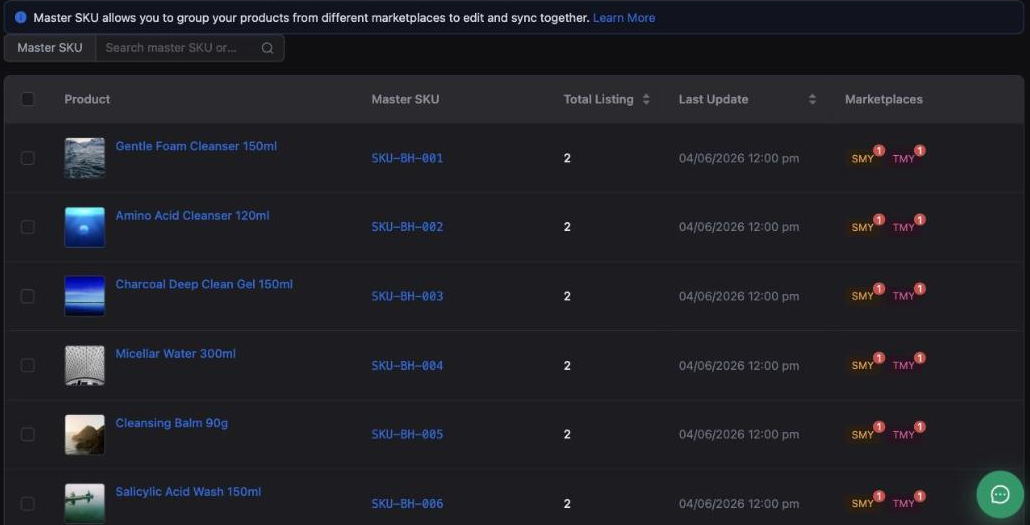
Inventory›Master SKU
(/inventory/master-sku).
 1
2
3
1
2
3
You know how many shops you sell that product in. A row showing 1 when you sell on two channels means one listing is unlinked and is being counted as a separate product. Sort by this column and the gaps surface immediately.
Bulk Link Master SKU handles the first pass — it is the fastest way through a catalogue you have never grouped before.
Listing Linking — the ones that did not match
Inventory›Listing Linking
(/inventory/listing-link).
Where you resolve listings Inseller could not group automatically. Work it after every new product launch — a listing created last week is invisible to grouping until someone links it.
A product you put live yesterday will sell, appear in orders, and still not be attached to a Master SKU. That is the single most common cause of "my stock count is wrong" and of a SKU showing up in Missing Cost SKUs a month later. Make linking part of your launch checklist.
Neighbouring screens: Listings (/inventory/listings) is every listing
across channels; Copy Listing (/inventory/copy-listing) duplicates one
to another shop; All Items (/inventory/items) is the product catalogue
itself.
Stock forecasting — what to reorder, and what it is costing you
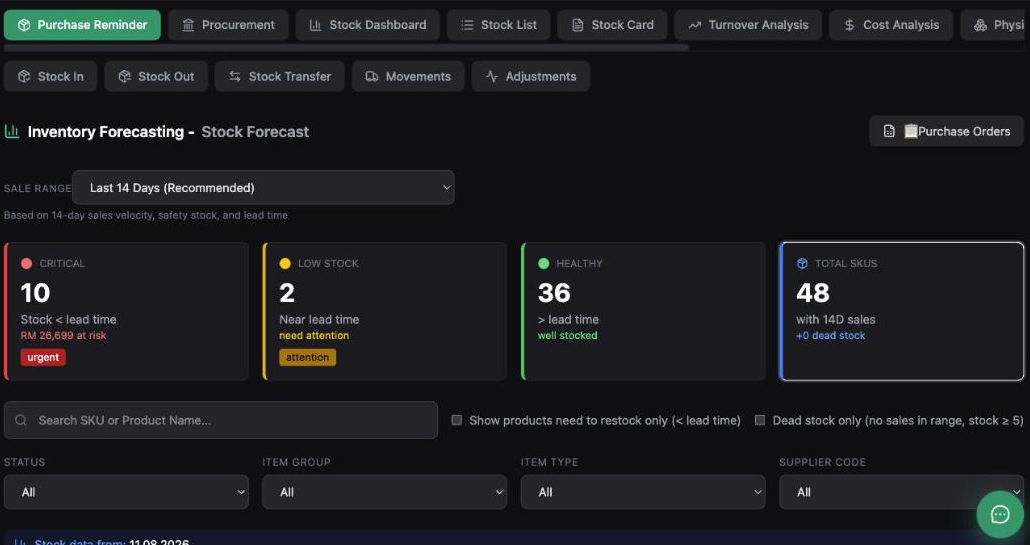
Inventory Dashboard (/inventory), Purchase Reminder tab.
 1
2
3
1
2
3
The forecast is built from 14-day sales velocity, safety stock and lead time. The four cards are a triage, not a report:
| Card | Meaning |
|---|---|
| CRITICAL · urgent | Stock will run out before a reorder can arrive — stock < lead time. The card puts a ringgit figure on it: revenue at risk. |
| LOW STOCK · attention | Near lead time. Order this week, not today. |
| HEALTHY | Cover beyond lead time. Nothing to do. |
| TOTAL SKUS | Catalogue size, with dead stock — items with no sales in the range. Cash sitting on a shelf. |
Show products need to restock only (< lead time) turns the whole list into a purchase order draft. Dead stock only does the opposite job — it finds what to discount or bundle before it ages further.
Every one of these buckets depends on the lead time and safety stock you set per product. Leave them at defaults and CRITICAL will either cry wolf or stay quiet until you are already out. Setting them is the optional onboarding step called "Set safety stock / lead time".
The rest of the inventory menu
| Screen | What it is for |
|---|---|
Stock Scan/inventory/scan | Barcode stock counting — the physical count that corrects the system. |
All Items/inventory/items | The product catalogue, one row per item. |
Warehouses/inventory/warehouses | More than one location to hold stock in. |
| Purchase · Hub | Purchase orders and supplier ETAs, from the Purchase Reminder above. |
| Stock Adj. · Hub | Adjustments, with a reason on each — damage, loss, correction after a count. |
The tabs across the Inventory Dashboard cover the same ground from the reporting side — Stock Dashboard, Stock List, Stock Card, Turnover Analysis, Cost Analysis — plus the movement actions Stock In · Stock Out · Stock Transfer · Movements · Adjustments.
A monthly ten-minute check
- Master SKU sorted by Total Listing — any product with fewer listings than shops you sell it in.
- Listing Linking empty, especially after a launch.
- CRITICAL worked through, and its revenue at risk figure understood rather than ignored.
- Dead stock only ticked once — decide to discount, bundle or write off.
Troubleshooting
Stock is wrong on one channel
Almost always an unlinked listing: that channel's listing is not under the Master SKU, so it is holding its own separate count. Check Total Listing for the product, then fix it in Listing Linking.
A product appears twice in reports
Two Master SKUs for one physical product, usually created when the same item was imported under two spellings. Merge them under one code — and prefer your internal code over any marketplace's.
CRITICAL is full of things I am not worried about
Lead times are too long or safety stock is too high for those items. They are per-product settings; a 30-day default on something your supplier delivers in 3 days will flag constantly.
Forecast looks wrong right after a live campaign
The default velocity window is the last 14 days, so one big live session skews it upward and the forecast will over-order. Change SALE RANGE to a longer window before placing a purchase order off the back of a spike.
Was this page helpful?