
Live & creators
Two of the hardest things to run in Malaysian e-commerce: a live team and a creator programme. Both burn money in ways a normal dashboard cannot see — an idle prime slot, a sample that never produced content. These screens are built to make that visible.
Sales, orders and session GMV arrive with the TikTok Shop authorization. Live-room
detail — the metrics that describe the broadcast rather than the sale — needs the separate
creator account authorization, which lives on the same shop card in
Settings›Integrations.
Most sellers stop after the shop OAuth and then wonder why the live tabs look thin.
Live Arena — the month at a glance
Live Performance in the sidebar, Arena tab.
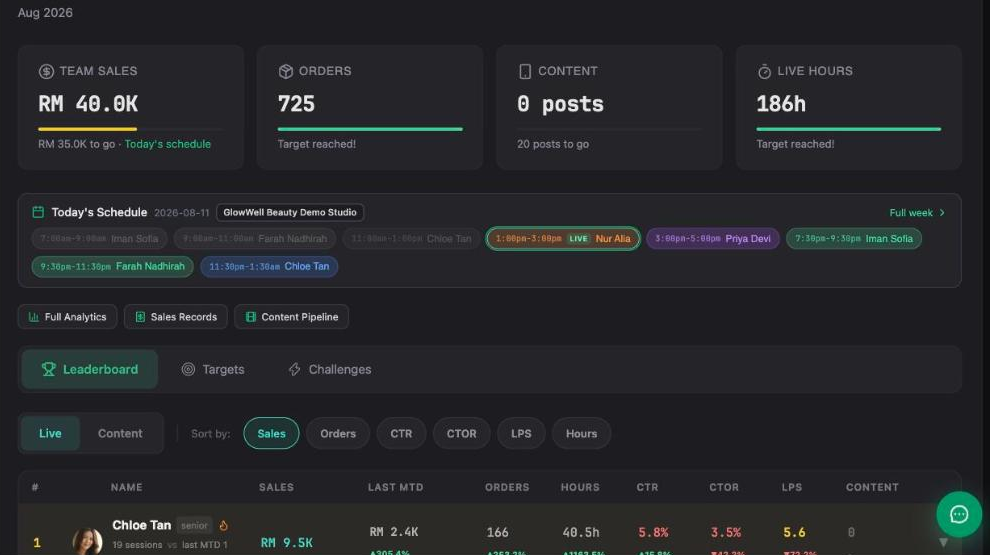
Four targets across the top, today's schedule under them, and the team leaderboard below. The tabs across the top — Arena · Schedule · Analytics · Meeting · Content · Attribution · Profit — go from "how are we doing" to "which session made money".
 1
2
3
1
2
3
Hours reaching target while sales lag is the single most useful signal on this screen: the team is broadcasting enough, so the problem is the slot, the host or the SKU mix — not effort. The reverse (sales fine, hours low) means you are leaving airtime unused.
The host leaderboard
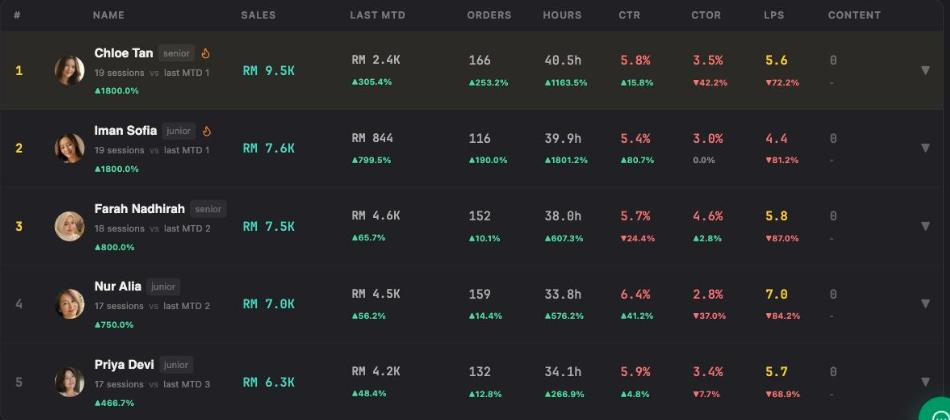
One row per host, sortable by Sales · Orders · CTR · CTOR · LPS · Hours, with a Live / Content switch for which kind of work you are ranking.
 1
2
1
2
| Column | What it tells you |
|---|---|
| SALES / ORDERS | Output. Necessary, but a host with more hours will win on these by default — which is why the next columns exist. |
| HOURS | Airtime. Divide sales by hours before you judge anyone. |
| CTR | How well the room pulls attention into the product. A hook-and-presentation problem when it is low. |
| CTOR | Click-to-order. How well the host closes once someone is looking. Low CTOR with healthy CTR = a pitching or pricing problem, not a traffic problem. |
| LPS | A per-session efficiency figure — the one to rank on when hours differ wildly between hosts. |
| CONTENT | Short-form posts produced. Live and content are tracked separately on purpose; a host can be excellent at one and absent from the other. |
Each host carries a senior / junior badge and a session count. A junior with 17 sessions and a senior with 19 are not comparable on total sales; they are comparable on CTOR and LPS. Ranking the wrong column is how you demoralise the person who is actually improving fastest.
Host Arena — what your hosts see
Host Arena in the sidebar.
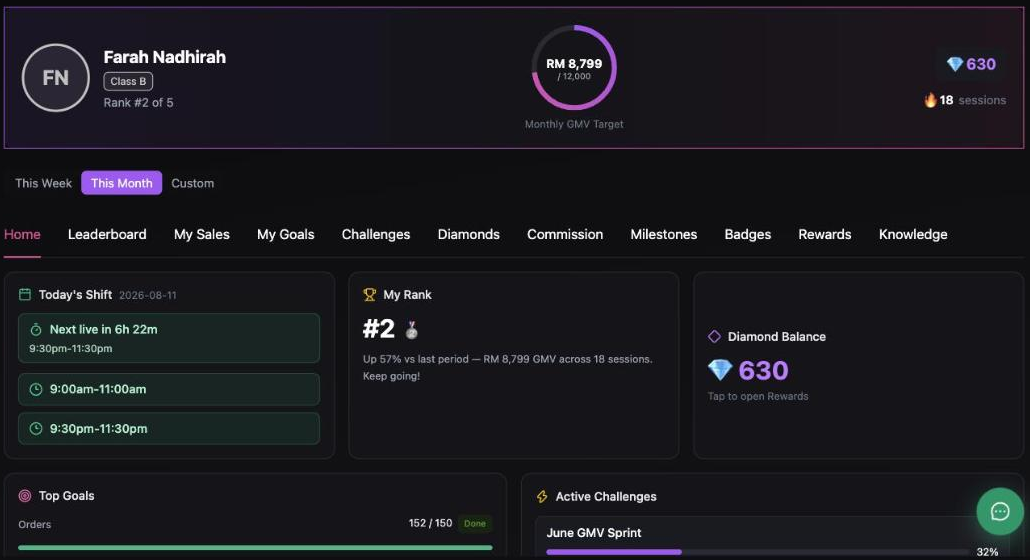
This is the host's own view, not yours. Each host signs in and sees their rank, their target, their shifts and their rewards — without seeing the company's P&L.
 1
2
3
1
2
3
Live hosts churn. A host who can see their own commission, their rank and how close they are to the next milestone has a reason to stay that a spreadsheet you email them does not provide. Commission and Rewards are the two tabs hosts actually open.
Hosts get their own login with the host role — they land here instead of on your dashboard.
Add them from Settings›Team,
and schedule them from Schedule & Hosts.
Affiliate — samples are real money
Affiliate in the sidebar, ROI Overview tab.
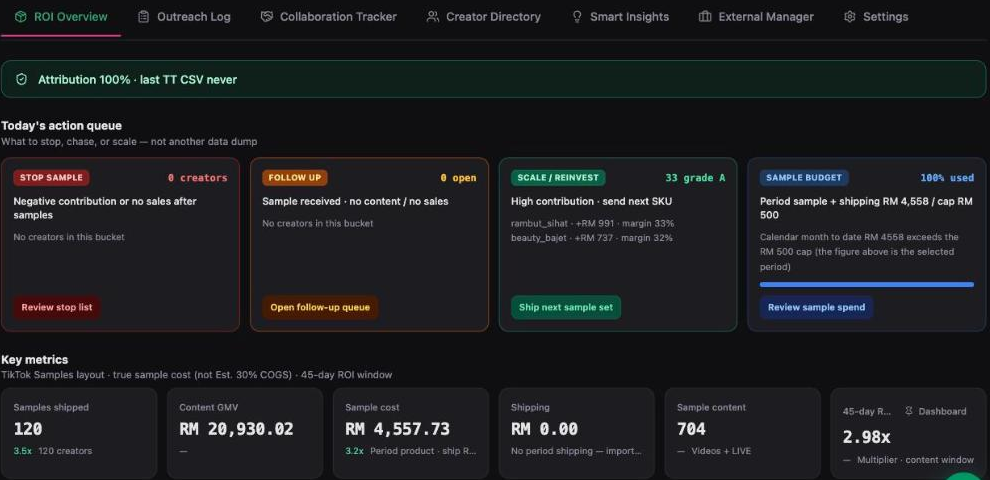
The creator programme has one failure mode that quietly dominates all others: you ship samples, and a large share of them never produce content or sales. Inseller prices that directly.
 1
2
1
2
True sample cost, not an estimated 30% of retail. A sample programme judged on an assumed cost percentage will always look cheaper than it is. And the 45-day ROI window is there because creator content keeps selling for weeks — judging a creator after seven days writes off people who were about to work.
Working the action queue
Four buckets, each with one decision and a button that takes you to it:
| Bucket | The decision |
|---|---|
| STOP SAMPLE | "Negative contribution or no sales after samples." These creators are costing you money. Stop shipping — that is the whole action. |
| FOLLOW UP | "Sample received · no content / no sales." Not yet a loss — a chase. The product is with them; a message often converts it. |
| SCALE / REINVEST | "High contribution · send next SKU." Your grade-A creators, with contribution and margin per creator. Send the next sample set. |
| SAMPLE BUDGET | Period sample + shipping against your cap, as a percentage used. When this reads 100%, the first three buckets stop being suggestions and start being a budget decision. |
Clear STOP first (it stops the bleeding), then FOLLOW UP (recovers money already spent), then SCALE with whatever budget is left. Doing it in the reverse order is how the sample cap gets consumed by creators who never delivered.
The other tabs — Outreach Log, Collaboration Tracker, Creator Directory, Smart Insights, External Manager — cover finding creators, tracking the conversation, and handing the programme to an agency.
A weekly review that fits in 15 minutes
- Live Arena — are LIVE HOURS and TEAM SALES moving together? If hours are ahead, fix the slot or the SKU mix, not the effort.
- Leaderboard, sorted by LPS — who is efficient rather than merely busy. Coach on CTOR.
- Affiliate action queue — clear STOP, then FOLLOW UP, then SCALE.
- Sample budget — if it is at 100%, decide what to cut before shipping anything else.
Troubleshooting
The live tabs are empty or missing most metrics
Sales come from the shop OAuth, but live-room detail needs the separate creator account authorization on the same shop card in Settings → Integrations. If you authorized it and the room metrics are still missing, re-run it and make sure the Live Data scope stays ticked — Inseller warns explicitly when a creator connects without it.
A host's numbers look wrong for a session
Check the session is stamped to the right studio and host in Schedule & Hosts. A session with no host assigned cannot appear on that host's row, and it will make the team total look larger than the sum of the leaderboard.
Sample cost looks higher than what I paid
It should — it is the true landed cost plus shipping, not a percentage of retail. If it looks wrong in the other direction, check the SKUs being sampled actually have costs set in SKU Costs.
A creator shows no sales but I know they posted
Attribution needs the affiliate feed to be current — the ROI Overview header states the attribution coverage and when the last TikTok CSV arrived. If that says never and coverage is short, import the affiliate export from Settings → Affiliate Data before judging anyone.
Was this page helpful?